Petalinux Custom Build
Releases
- 2023.2
Recommended Version
| Vivado: | 2023.2 |
| Petalinux: | 2023.2 |
Common Compilation Issues
Petalinux, Ubuntu, Python Version mismatch: Version mismatches between PetaLinux, Ubuntu, and Python can lead to issues during a PetaLinux custom build. It’s important to ensure that the versions of all components are compatible. Refer to the requirements in the user manual.
Compilation issues are common when using custom FPGA designs. The below read can help with that.
Petalinux Custom Build
- For custom design import the hardware description with petalinux-config command, by giving the path of the directory containing system.xsa file as follows.
host@host: petalinux-config –get-hw-description=<path-to-xsa-file>
- The above command launches the top system configuration menu as shown below. Select ‘save’ then exit.
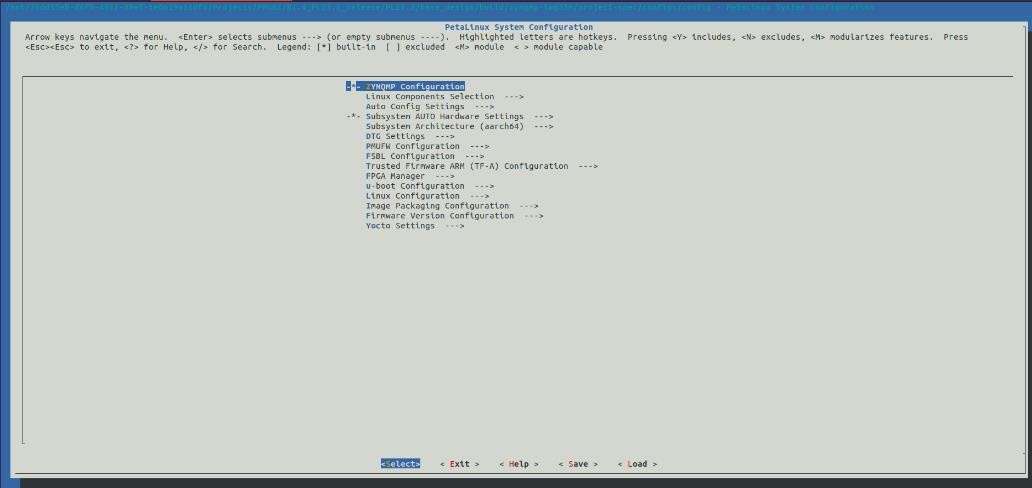
- To build the binaries, execute the command below.
host@host: petalinux-build
- After the successful compilation, the binaries will be placed in the path below.
host@host: ~/<path to petalinux directory>/images/linux/
- To create BOOT.bin, execute the below command. The BOOT.bin will be created in images/linux folder.
host@host:/<path-to-build-Directory>/images/linux~$ petalinux-package –boot –format BIN –fsbl images/linux/zynqmp_fsbl.elf –pmufw images/linux/pmufw.elf –atf images/linux/bl31.elf –fpga images/linux/system.bit –u-boot images/linux/u-boot.elf -o images/linux/BOOT.bin
Yocto Custom Build
- In the yocto project directory, copy the custom XSA in the path below.
host@host: ~/sources/meta-iwave/recipes-bsp/hw-description
- Open the “.conf” file, add the checksum of the custom XSA file and save the file.
Example: host@host: /yocto-sdk/build~$ vi ../sources/meta-iwave/conf/machine/zynqmp-iwg35m.conf HDF_URI[sha256sum] =”20738836e5d349c27624682c85f1cd9f61eb812836eba22d2ac5881afe25918a”
- Clean and build device tree, fsbl-firmware, pmu firmware using the command below.
host@host: ~/yocto-sdk/build$ bitbake -c cleanall fsbl-firmware pmu-firmware device-tree
- To build the binaries, execute the command below.
host@host: ~/yocto-sdk/build$ bitbake petalinux-image-minimal
- After the successful compilation, the binaries will be placed in the path below.
host@host: ~/yocto-sdk/build/tmp/deploy/images/zynqmp-iwg35m
Note: When working on custom designs, hardware layout & custom IP cores may differ from the default configuration. Please make sure to customize the system-user.dtsi file accordingly to avoid compilation errors. The checksum can be obtained by running the command “sha256sum <path-to_XSA>/system.xsa” in Linux terminal.
EXT4 Filesystem Customization
- Follow the below procedure to compile root file system in ext4 format instead of initramfs in Petalinux.
- Run the below command in petalinux directory
host@host: petalinux-config
- Select “Image Packaging Configuration” then select “Root filesystem type”. Now select the “EXT4 (SD/eMMC/SATA/USB)” with the space key.
- Now save the configuration and compile the petalinux (with petalinux-build command).
- Extract the rootfs “images/linux/rootfs.tar.gz” into ext4 partition of SD card and boot from SD card.
- After copying the binaries, boot the board and stop in U-Boot and enter the below commands:
$ env def -f -a
$ setenv sdbootdev ‘1’
$ setenv sdboot ‘mmc dev $sdbootdev && mmcinfo; echo Copying Linux from mmc$sdbootdev to RAM… && load mmc $sdbootdev ${fdt_addr_r} system.dtb && load mmc $sdbootdev
${kernel_addr_r} Image && booti ${kernel_addr_r} – ${fdt_addr_r}’
$ setenv bootargs ‘earlycon clk_ignore_unused earlyprintk root=/dev/mmcblk1p2 rootfstype=ext4 rw rootwait’
$ saveenv;boot
Note: For partitioning the SD card, refer to the software user manual. For Yocto, this customization is not required, since by default both rootfs will be generated.
FAQs
Petalinux, Ubuntu, Python Version mismatch: Version mismatches between PetaLinux, Ubuntu, and Python can lead to issues during a PetaLinux custom build. It's important to ensure that the versions of all components are compatible. Refer to the requirements in the user manual.
- Follow the below procedure to compile root file system in ext4 format instead of initramfs in Petalinux.
- Run the below command in petalinux directory
- Follow the below procedure to compile root file system in ext4 format instead of initramfs in Petalinux.
- Run the below command in petalinux directory
